

















Contents
- 1 Online Slicer: Streamline 3D Printing in Minutes
- 1.1 What Is an Online Slicer?
- 1.2 Why Use an Online Slicer?
- 1.3 Top Features to Look for in an Online Slicer
- 1.4 Online Slicer vs. Traditional Desktop Slicer
- 1.5 Tips to Streamline 3D Printing with an Online Slicer
- 1.6 Advantages for Beginners and Professionals
- 1.7 Industries Benefiting from Online Slicers
- 1.8 Common Misconceptions About Online Slicers
- 1.9 Future of Online Slicers
- 1.10 Conclusion: Why an Online Slicer Is a Must-Have Tool
Online Slicer: Streamline 3D Printing in Minutes
If you’ve ever tried 3D printing, you know that the process can be exciting, frustrating, and utterly transformative—all at the same time. The thrill of watching a design come to life layer by layer is unmatched, but getting there requires precision, patience, and the right tools. One of the most essential tools for anyone looking to make 3D printing smoother is an online slicer.
Unlike traditional software that demands installation, updates, and powerful computers, an online slicer offers accessibility, flexibility, and speed—all through your browser. In this article, we’ll explore why an online slicer is a game-changer, how it works, its best features, and tips for maximizing your 3D printing efficiency.
What Is an Online Slicer?
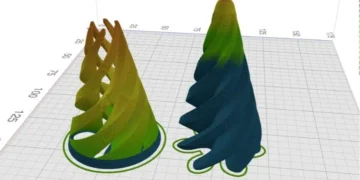
An online slicer is a web-based software tool that converts 3D models (usually in STL or OBJ format) into instructions your 3D printer can understand. These instructions, known as G-code, tell the printer how to build your model layer by layer.
Unlike traditional desktop slicers, online slicers run in the cloud or directly through your web browser. This eliminates the need for installations, heavy processing power, or constant software updates. The result? You can prepare your prints from almost any device—desktop, laptop, or tablet—without sacrificing quality.
Key Functions of an Online Slicer
-
Model slicing: Converts 3D designs into layer-by-layer instructions.
-
Print settings customization: Allows adjustments in layer height, infill density, support structures, and print speed.
-
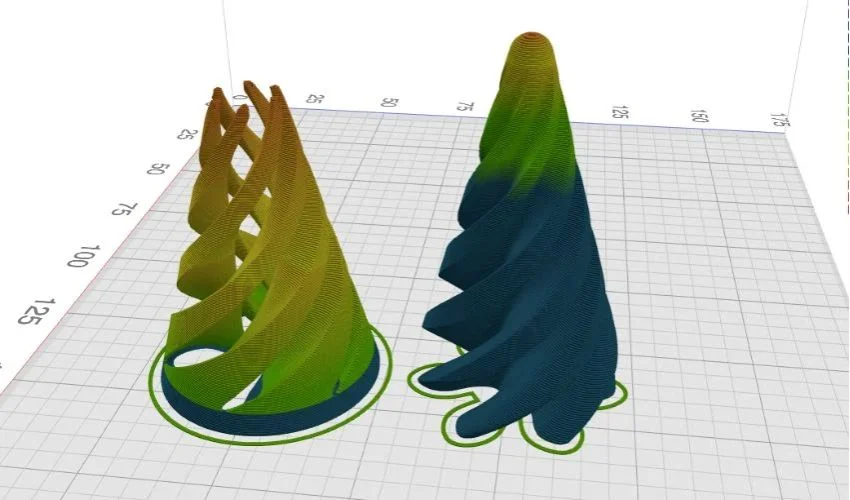
Real-time previews: Shows how the printer will execute each layer.
-
File optimization: Ensures the model is ready for printing without errors.
-
Cloud storage: Lets you save and access files from any device.
By streamlining these functions, an online slicer reduces preparation time and makes 3D printing more accessible, even to beginners.
Why Use an Online Slicer?
Using an online slicer offers several advantages over traditional desktop software:
1. Accessibility Anywhere
Because online slicers are cloud-based or browser-based, you can access your projects from anywhere. Whether you’re at home, at a workshop, or traveling, your 3D printing workflow is portable.
2. Low System Requirements
You don’t need a high-end PC or large storage space. A simple web browser and internet connection are enough, making it ideal for schools, hobbyists, or startups.
3. Time Efficiency
Online slicers are optimized for speed. You can slice models, preview prints, and export G-code in minutes. Some tools even have automated settings that adjust print parameters based on your model.
4. Cross-Device Synchronization
Many online slicers store your projects in the cloud. This means you can switch between devices seamlessly, collaborate with team members, or continue a project from a different location without losing progress.
Top Features to Look for in an Online Slicer
When choosing an online slicer, there are several key features that can improve your 3D printing experience:
-
Support Structure Generation: Automatically add supports where needed for overhangs.
-
Layer Preview: Visualize each layer to detect potential issues before printing.
-
Custom Profiles: Save different settings for PLA, ABS, or other filaments.
-
Model Repair Tools: Detect and fix holes or errors in your 3D model.
-
Integration with Printers: Some online slicers directly connect to printers via Wi-Fi.
-
Collaboration Tools: Share models with teams or clients for feedback.
These features ensure your prints come out clean, accurate, and without wasted material.
Online Slicer vs. Traditional Desktop Slicer
| Feature | Online Slicer | Desktop Slicer |
|---|---|---|
| Installation Required | No | Yes |
| Accessibility | Any device with a browser | Only installed device |
| Updates | Automatic | Manual |
| Cloud Storage | Usually included | Optional |
| Collaboration | Easy sharing | Limited |
| System Requirements | Low | Moderate to high |
Both have pros and cons, but online slicers excel in convenience, speed, and remote access.
Tips to Streamline 3D Printing with an Online Slicer
1. Optimize Your Model Before Slicing
Even the best online slicer cannot fix a poorly designed model. Ensure your 3D model is clean, manifold, and free of errors. Use model repair tools integrated into the slicer if needed.
2. Choose the Right Print Settings
Adjust layer height, infill density, and support structures based on your design goals. For example, higher infill improves strength, while thinner layers enhance surface detail.
3. Preview Layers Carefully
Always use the slicer’s preview mode. Inspect for potential problem areas, unsupported overhangs, or gaps in the model. This simple step can save hours of printing time and material.
4. Automate Where Possible
Many online slicers offer preset profiles for common materials or printers. Using these presets can reduce trial and error, especially for beginners.
5. Save and Backup Projects
Even though online slicers store files in the cloud, it’s smart to download backups. This ensures you don’t lose valuable projects due to connectivity issues or service interruptions.
Advantages for Beginners and Professionals
For Beginners:
-
No need to install heavy software.
-
Guided settings make slicing easier.
-
Quick previews allow learning by trial and error.
For Professionals:
-
Collaboration tools for team projects.
-
Fast cloud-based slicing saves valuable time.
-
Advanced customization supports complex prints.
Industries Benefiting from Online Slicers
Online slicers are no longer just a hobbyist tool. They are increasingly used in:
-
Product Design and Prototyping: Quickly iterate and visualize designs.
-
Education: Teach 3D printing in classrooms without complex setups.
-
Healthcare: Print anatomical models for planning and education.
-
Engineering: Test and refine parts before production.
-
Art and Jewelry: Create precise, detailed pieces efficiently.
The flexibility of an online slicer makes it a versatile tool across fields.
Common Misconceptions About Online Slicers
-
“They are less accurate than desktop slicers” – Modern online slicers are optimized for precision and often match desktop performance.
-
“You need a constant internet connection” – Some tools allow offline mode for basic slicing.
-
“Only for beginners” – Many online slicers offer advanced settings for professional-grade prints.
Understanding these points helps users trust the online slicer for serious projects.
Future of Online Slicers
The future of online slicers is exciting. Cloud computing, AI, and real-time collaboration will continue to make 3D printing faster, smarter, and more accessible. Imagine slicing models with AI-assisted recommendations for print quality, material savings, and support optimization—all in seconds.
As 3D printing becomes a standard part of prototyping and manufacturing, online slicers will increasingly bridge the gap between design and production.
Conclusion: Why an Online Slicer Is a Must-Have Tool
In 2026 and beyond, 3D printing will continue to evolve, and so will the tools we rely on. An online slicer is more than just convenience—it’s a productivity booster, a collaboration platform, and a learning tool. Whether you’re a hobbyist creating your first miniatures or a professional designing complex prototypes, an online slicer streamlines your workflow, saves time, and improves print quality.
Investing time in mastering an online slicer is not optional—it’s essential for anyone serious about 3D printing. Start exploring the tools today, optimize your workflow, and watch your prints improve dramatically.
Which online slicer do you use, and what’s your favorite feature? Share your experience in the comments and join the community of makers transforming ideas into reality.